

TL;DR
- Robot-use agents are still far too slow for the real world. Benchmarks like RoboDojo don't show it, because their simulators wait for the model before stepping.
- The agent's time goes mostly to per-request overhead, time to first token (TTFT) above all, which it pays on every tool-call round trip. So we cut the number of requests, kept the context short and made the tools faster.
- We then pipelined thinking and motion: the robot carries out the agent's actions while the model plans the next ones, which hides most of the model's time behind motion.
- Finished towel-folding runs went from a median of about 18 minutes to about 6, and on a cup task the robot moved 84% of the time. What remains is latency: the robot acts on what it saw about 5 seconds earlier.
Code: github.com/fast-rua/making-rua-fast, the robot API, the robot server and the agent harness we used, with a small simulator to try them in.
Over the past year, robot-use agents (RUAs) have become a serious alternative to end-to-end robot policies. GPT-6 Astra, driving a robot through code, scored above all 40 public policies on RoboDojo[1]. Uni-robot-agent put open-weight models such as Qwen3.8-Flash-Next on the same benchmark, well ahead of VLA and world-action-model baselines like π0.5 and OpenWAM-α[2]. Anthropic reports 64.9% on RoboDojo Sim for Fable 5.2[3].
On a real robot, though, these agents are slow. In Fable 5.2's launch video the robot solves a puzzle cube[3], but even with the pauses cut out, the solve takes about an hour.
Benchmarks like RoboDojo don't capture this. Their evaluation loop is synchronous: the simulator blocks until the policy returns its next actions, and episodes are limited by the number of steps, not by time[4]. In this setting a long TTFT or slow decoding costs nothing. JustRUA, a controlled study of GPT-6 Astra agents on RoboDojo, says as much: it reports what an episode costs, not how long it takes, because in simulation time can be hidden by running episodes in parallel[5]. On a real robot the clock keeps running while the model thinks, and the robot sits idle until the next command arrives.
In this post we describe our first attempts at closing this gap on a real two-arm robot. We didn't change the model. Everything we did was in the harness around it: the tools the agent calls, what goes into its context, and how its actions are scheduled.
Setup
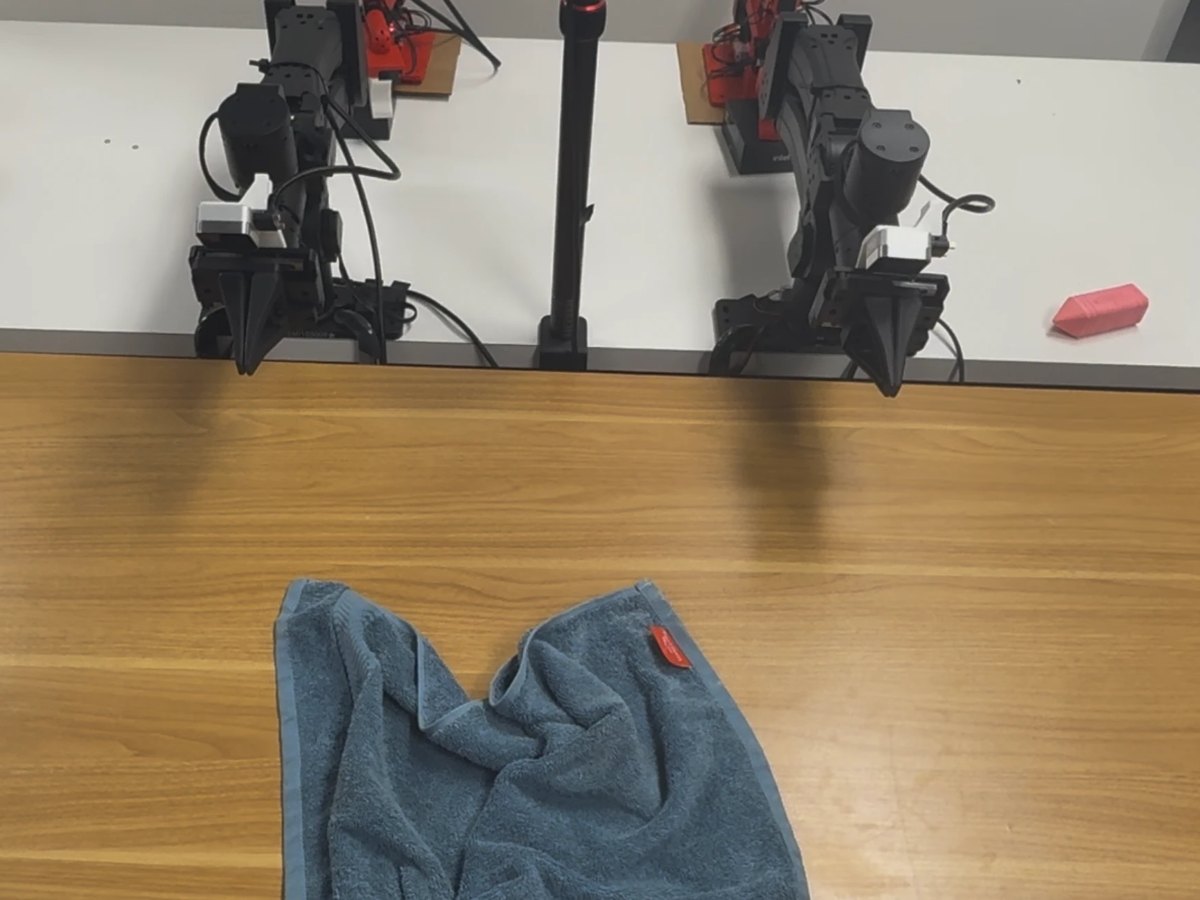
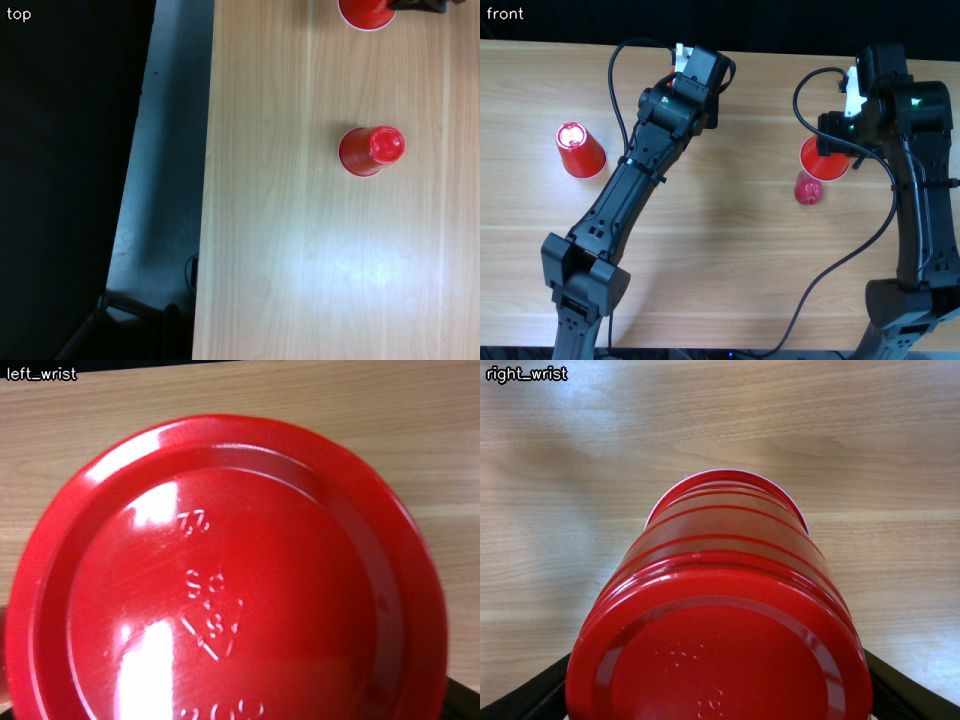
Our cell has two YAM arms and four cameras: one overhead, one in front and one on each wrist. The agent is GPT-6 Astra running in Codex at its ultrafast service tier and medium reasoning effort. It is given a task description and a Python robot API, with no scripted skills or demonstrations.
Like PyRUA-Lean[6], we use code as the action interface: the robot is a Python object, and the agent acts by writing short programs against it. We also designed the tools as a white box. The robot API is ordinary Python source that the agent can read, and in practice it starts most tasks by reading it and then writing its own helper functions, such as one that lifts a particular cup. A separate robot server checks every command against a workspace fence and a minimum distance between the arms, which lets the agent run code it wrote itself without anyone reviewing it first.
↑ reads
↑ imports
No internet: only the model API, the robot server and the cameras.
↓
Outside the sandbox
Model GPT-6 Astra, OpenAI API
The agent is GPT-6 Astra running in Codex at its ultrafast service tier and medium reasoning effort. It is given a task description and a Python robot API, with no scripted skills or demonstrations.
Throughout this work we treated Codex and OpenAI's serving as a black box. We could change only what the harness sends and when, and we could not even see how the time before the first output splits between prefill, queueing and the rest of the server.
From Setup and What's next.
The boundary
Sandbox bubblewrap
Codex and everything the agent runs sit in a sandbox with no internet access.
No internet: only the model API, the robot server and the cameras.
From this figure and its caption.
Sandbox
Codex the agent's loop and tools
Like PyRUA-Lean[6], we use code as the action interface: the robot is a Python object, and the agent acts by writing short programs against it.
Its tools include
- exec_command
- write_stdin
- view_image
No web search or browser.
A program that renders images now returns them in its own tool result, in the same step, so the model sees them without a separate request.
From Setup and 2. Fewer round trips.
Sandbox
Persistent Python kernel imports once; variables persist
The largest improvement came from running the agent's code in a persistent Python process. Imports are paid for once, Python starts a call in tens of milliseconds instead of a few hundred, and variables and helper functions survive from one call to the next (Figure 9).
Every action ends by printing the robot's state (where each arm is, whether the grippers are holding something, and any faults) and attaching a camera view. The agent can add its own outputs with hooks: functions it registers once, which run at the end of every motion and add what they print and draw to the same result.
When an action ends, all of this comes back together as one message, the action's report (Figure 6).
From 4. Faster tools and 2. Fewer round trips.
Persistent Python kernel · pipelining
kernel.queue runs while the model thinks
kernel.queue([lift_left, lift_right])             # run in order, in the background
kernel.queue(new_plan, replace_from="lift_right") # swap out lift_right and what follows, while lift_left runs
kernel.action().stop()                            # stop now; the arms hold
The report for one action arrives as the next one starts, so the model reads how the last action went while the robot is already busy, and still has time to revise the action after that.
Each report lands while the next action is already running, so the model's request time is hidden, as long as it writes the next action before the robot runs out of them.
From 5. Pipelining: hiding time behind motion, and Figure 10.
Sandbox · read-only
Robot API source white box
We also designed the tools as a white box. The robot API is ordinary Python source that the agent can read, and in practice it starts most tasks by reading it and then writing its own helper functions, such as one that lifts a particular cup.
The agent reads
- robot/
- MANUAL.md
From Setup.
Sandbox · read-write
/workspace the agent's own helpers
In practice it starts most tasks by reading it and then writing its own helper functions, such as one that lifts a particular cup.
Three calls from the crumpled-towel run in Video 3, all sent to the same Python process (code and output shortened). The second call uses the helper far defined in the first, and the third uses floor from the second. None of them imports robot, np or viz.
From Setup and Figure 9.
Outside the sandbox
Robot server fence + arm distance, IK, control
A separate robot server checks every command against a workspace fence and a minimum distance between the arms, which lets the agent run code it wrote itself without anyone reviewing it first.
Checks that need no judgment happen on the robot server, which checks every command as it is sent (reach, the fence, the distance between the arms) and refuses a bad one before the arm moves.
From Setup and 2. Fewer round trips.
The cell
2 arms, 4 cameras two YAM arms
Our cell has two YAM arms and four cameras: one overhead, one in front and one on each wrist.
Left: the two YAM arms, with a towel laid out for folding. Right: the four camera views tiled into one image, as the agent receives them.
From Setup and Figure 2.
Where the time goes
Our early towel-folding runs on the real robot took between 13 and 37 minutes. Figure 4 profiles one of the longest. The model accounted for 78% of the wall time and tool calls for nearly all the rest. The robot moved for only a quarter of the run, and much of that motion happened inside blocking calls the agent was waiting on.
Very little of the model's time went to producing output. About two thirds of it was TTFT. Measured from the harness, it covers prefill, the network and any other processing on the server; through the API we can't tell how it splits. A response with fewer than 100 output tokens still had a median TTFT of about two seconds, and an agent pays it on every tool-call round trip. Many of these requests did very little: the agent would spend a whole round trip viewing an image, checking on a program it had started, or asking where an arm had ended up. On average it made several requests per robot action, and the robot was idle through all of them.
Agent workloads are input-heavy, especially robot-use agents with their frequent image reads: the context grows with every step, while each output is a short tool call. So TTFT, paid on every request, outweighs decoding. To go faster, we needed the agent to make fewer requests and make each one cheaper, and the requests that remained had to happen while the robot was moving rather than before it.
1. Faster decoding
In short timed requests, Astra's ultrafast tier generated tokens about four times faster than the Fast (priority) tier, with the same time to first output. In our towel runs the median model response fell from 2.9 s to 1.9 s, a third shorter. These were different episodes, so the comparison is rough, but it fits the profile above: decoding was the smaller part of each response, and a faster decoder leaves TTFT where it was.
2. Fewer round trips
Since every request has a fixed cost, we looked for requests that were predictable, meaning the agent almost always made them around a certain kind of action, and merged them into the request that writes the action. Two patterns stood out (Figure 5). Before an action, the agent often reviewed its plan: it drew a ghost of the planned grasp into the camera images, looked at it, and then ran the action in a second request. After the action, it spent several more round trips looking: it captured the cameras, read each image in its own request, and asked for the robot's state. Neither involves a new decision.
The look comes back with the action. A program that renders images now returns them in its own tool result, in the same step, so the model sees them without a separate request. Every action ends by printing the robot's state (where each arm is, whether the grippers are holding something, and any faults) and attaching a camera view. The agent can add its own outputs with hooks: functions it registers once, which run at the end of every motion and add what they print and draw to the same result. In the crumpled-towel run, one hook found the towel in the front camera and listed a dozen points on it. When an action ends, all of this comes back together as one message, the action's report (Figure 6).
Two smaller changes removed follow-up requests. Error messages say which limit was hit and by how much, so the agent can usually fix the problem on its next try. And checking whether a set of candidate poses is reachable takes one call for the whole list rather than one call per pose.
Code runs as soon as it is written. The reviews changed the agent's plan in only about 4 of 99 cases, yet each one cost a full round trip per action. Now the agent starts the action in the same request that writes it, and looks at the plan while the arm is already moving. If something is wrong, it stops the action and the arms hold. Checks that need no judgment happen on the robot server, which checks every command as it is sent (reach, the fence, the distance between the arms) and refuses a bad one before the arm moves. Section 5 takes this further with pipelining: the agent writes the next actions while one runs.
3. Keep the context short
A robot agent looks at a lot of images, and as they pile up in the context, TTFT grows on every request, even though the earlier context is cached. We handled this in two ways. First, we send the four camera views as a single tiled image instead of four separate ones, which keeps TTFT noticeably lower even at the same resolution (Figure 8).
Second, once about 20 images have built up, the harness moves the conversation to a fresh thread in which older images are replaced by short text notes and only the newest few are kept (Figure 7). The first request after a prune can't use the prompt cache, so we prune between turns.
4. Faster tools
Once most of the extra requests were gone, the time spent inside tools became noticeable, at 6 to 10% of the run. Most of it sat between a look and the next action, where nothing else could happen. The largest improvement came from running the agent's code in a persistent Python process. Imports are paid for once, Python starts a call in tens of milliseconds instead of a few hundred, and variables and helper functions survive from one call to the next (Figure 9). We also made camera capture faster.
5. Pipelining: hiding time behind motion
Even with all of the above, the agent still makes a few requests for each action, and as long as the next action can't start until the model has written it, the robot waits through every one of them. The last change was to let the model think while the robot moves.
The agent writes each action as a Python function and passes it to the kernel. The robot runs the actions in order, in the background, while the model plans what comes next, and the model can change the plan at any point: it can replace everything after a given action, or stop the one that is running.
kernel.queue([lift_left, lift_right])             # run in order, in the background
kernel.queue(new_plan, replace_from="lift_right") # swap out lift_right and what follows, while lift_left runs
kernel.action().stop()                            # stop now; the arms hold
The timing of feedback turned out to matter (Figures 10 and 11). The report for one action arrives as the next one starts, so the model reads how the last action went while the robot is already busy, and still has time to revise the action after that. If the model finishes its turn while the robot is still moving, the harness sends it a fresh camera view so that it gets started on the next step instead of sitting idle. And because each action starts from wherever the previous one left off, the agent writes actions that check their own preconditions, for instance that a cup is still in the gripper before carrying it anywhere.
Uni-robot-agent[2] uses the same idea. Its tool calls can run in the background, so the model keeps reasoning while the robot executes, and in simulation this cut episode times substantially. Our version differs mainly in how results come back: the agent doesn't ask for them. Each action's report reaches it as a message as the next action starts, while there is still time to change what comes after.
Results
We first compare real runs. Figure 13 shows every towel-folding run that finished the task or ran for at least a few minutes, grouped by the three versions of the harness we ran on the robot: the original, one with fewer round trips, a shorter context and faster tools but no pipelining, and the full harness with pipelining. Run times vary a lot, because they depend on how the towel starts out and on the choices the agent makes, and many runs were stopped before the end. Alongside time to finish, we therefore show two measures that don't need a finished run: how much of the time the robot was moving, and how much of the model's time overlapped motion.
Cutting round trips raised the robot's moving share from a median of 29% to 52%, because the robot spent less time waiting between actions. It hid none of the model's time, though, since every action still blocked. Pipelining is what hid it: the median share of model time that overlapped motion went from almost none to about half. Runs that finished took a median of about 6 minutes with the full harness, against 16 to 18 minutes with the earlier versions.
Because real runs vary this much, they can't tell us what each design contributes on its own. For that we took one real run of the cup task, made with the full harness, and replayed it without each design in turn. The replay keeps the same model responses, tool calls and actions in the same order, and adds back the requests each design removes, at the step and tool costs we measured on the robot. Only the last bar in Figure 14 is the real run.
Together, the changes reduce the wall time of this task from 667 s to 204 s, a 3.3× speedup. Before pipelining, almost all of the gain comes from cutting the number of model requests. Pipelining doesn't reduce the model's time at all, but it moves 137 of the 182 seconds of model time into periods when the robot is moving. From the first motion to the end, the robot goes from moving 24% of the time to 84%.
The table below lists the three runs from our demo videos, all made with the full harness. The last column is the median time from the latest observation the model had received (a report or a camera view) to the moment it submitted its next action.
| Task (real runs) | Time to finish | Actions | Robot moving* | Model time hidden | Observation → action |
|---|---|---|---|---|---|
| Three cups hide a pear, a ball and nothing; put the pear under the empty cup | 204 s | 14 | 84% | 75% | 5.7 s |
| Spread a partly folded towel and fold it in half | 143 s | 11 | 67% | 49% | 4.7 s |
| The same, from a crumpled towel | 484 s | 32 | 78% | 74% | 6.0 s |
* From the first motion to the end of the task. Times and videos exclude the agent's initial reading of the robot API code.
JustRUA[5] reports two more things for each of its simulated episodes: what the episode consumed, and what the agent was doing in it. We looked at the same two for these three runs. Unlike the table above, the numbers below cover the whole episode, including the agent's initial reading of the robot API code.
| Run (whole episode) | Requests | Input tokens | Cached | Output tokens | Context* |
|---|---|---|---|---|---|
| Cups | 60 | 5.8 M | 95% | 14.0 k | 80 k |
| Partly folded towel | 44 | 7.4 M | 96% | 10.0 k | 156 k |
| Crumpled towel | 110 | 26.3 M | 98% | 36.7 k | 195 k |
* Median input tokens per request.
Like theirs, our episodes are almost all input: a run reads between 5.8 and 26.3 million input tokens and writes between 10 and 37 thousand, a ratio of 400 to 700 to one. Nearly all of that input had been sent before and came from the cache, so it is cheap to pay for, but each request still carries a context of 80 to 195 thousand tokens, which is why TTFT and not decoding sets the pace.
The second table splits the model's time in the three runs by what each request was for, and shows for how much of that time the robot was idle.
| Request (three runs) | Requests | Model time | Share | Robot idle |
|---|---|---|---|---|
| Queue or run a motion | 57 | 252 s | 32% | 30% |
| Capture or render camera views | 62 | 250 s | 32% | 36% |
| Look up 3D points or IK | 18 | 90 s | 11% | 6% |
| Read files | 30 | 53 s | 7% | 85% |
| Wait on a running command | 15 | 34 s | 4% | 19% |
| Message only | 11 | 25 s | 3% | 22% |
| Read the robot's state | 2 | 6 s | 1% | 0% |
| Other | 19 | 81 s | 10% | 36% |
| All | 214 | 792 s | 100% | 32% |
Motions and camera views take about a third of the model's time each, and for both the robot was idle for about a third of it. Geometry lookups are almost fully hidden, because the agent makes them while an earlier action is still running. Reading files is the opposite: most of it happens before the first motion, when there is nothing to hide it behind.
TaskThree cups hide a pear, a ball and nothing; put the pear under the empty cup.
1×, no cuts- I’ll inspect the cups, identify the pear and the empty cup, then move the pear and verify its placement.
- I’ll lift the cups vertically to reveal their contents. I’m checking each grasp for clearance so the fingers don’t push a cup into the object underneath.
- The left cup contains the ball. I’ll replace it and continue checking the other two cups.
- The right cup has revealed the pear. I’m checking that the middle cup is empty and clearing both cups so I can grasp the pear without catching either rim.
- The pear is under the right cup. I’m checking the empty cup and preparing the transfer.
- The middle cup is empty. I’ll move the pear to that cup’s original position, then lower the empty cup over it.
- The empty cup is set aside, and the gripper is closing around the pear. I’ll verify the lift before moving it across the table.
- The pear is securely lifted. I’m moving it to the middle position, then I’ll check its location before covering it with the empty cup.
- The pear is being placed at the middle position. The empty cup will follow once placement is verified.
- The pear is on the table at the middle position. I’m checking the cup’s alignment before lowering it.
- The cup now covers the pear. I’ll release it, withdraw the gripper, and check that it settles on the table.
- The previously empty cup is resting over the pear, and both grippers are clear. I’m marking the task complete.
- lift_left_cup
- lift_right_cup
- replace_ball_cup
- lift_center_cup
- park_right_cup
- park_center_cup
- view_pear
- grasp_pear
- pick_empty_cup
- transfer_pear
- hover_empty_cup
- lower_cup_check
- seat_cup
- release_cup
Limitations
Hiding the model's time behind motion is not the same as making the agent fast. Even when pipelining hides nearly all of it, every action is still based on an observation that is about 5 seconds old by the time the action is submitted (Figure 15). The robot moves most of the time, but it reacts like a player in a game with very high ping.
This is also why pipelining helps some tasks much more than others. Lifting three cups in turn can be planned from a single look, so several actions wait their turn and the robot rarely stops. Cloth needs a look after almost every grasp, so at most one action waits behind the running one, and every few actions the robot waits while the model looks and thinks (Figure 16). Tasks that need fine, live correction are the worst case. In our ring-stacking runs, where the agent had to line a ring up over a peg, the robot was moving only 28 to 36% of the time even with pipelining, because each small correction depended on seeing the result of the last one.
Closing this gap needs a shorter loop from observation to action. That means lower TTFT and less reasoning on routine steps, but it may also mean splitting the work, so that a faster, smaller model or a reactive controller handles the corrections that can't wait several seconds.
What's next
Throughout this work we treated Codex and OpenAI's serving as a black box. We could change only what the harness sends and when, and we could not even see how the time before the first output splits between prefill, queueing and the rest of the server. Much of the remaining latency sits on that side. With a model we serve ourselves, the harness and the server can be designed together, and we see many openings there: processing the next camera view while the arm is still moving, before the model is asked about it; dropping old images from the cache without paying for a full prefill; and scheduling a robot's requests so that a correction is not stuck in a queue. We think co-designing serving with the harness can take this a good deal further.
Acknowledgement
We thank Quanquan Peng and Xiaolong Wang for providing the YAM robot arms and for their guidance on using them.
Contributors
Shaoxiong Duan, Yang Yuanbo, Junda Chen, Quanquan Peng, Hao Zhang
References
- 1An Unexpected Robot Policy: Early Evaluations of GPT-6 Astra on RoboDojo. arXiv:2609.24170
- 2Democratizing Robot-Use Agents: A Unified Harness with Open Models (uni-robot-agent). arXiv:2611.01560
- 3Anthropic, Claude Fable and Mythos 5.2. anthropic.com
- 4RoboDojo. arXiv:2607.04434; evaluation loop in github.com/robodojo-benchmark/RoboDojo (
src/eval_client/eval_env.py). - 5JustRUA: A Controlled Study of GPT-6 Robot-Use Agents. arXiv:2611.16009
- 6Fewer Tokens, Better Action: GPT-6 Astra Robot Agents with 14% Higher Success Rate but 65% Fewer Tokens (PyRUA-Lean). arXiv:2610.01939
Citation
@misc{realtimerua2026,
  title        = {Getting Robot-Use Agents to Run in Real Time},
  author       = {Duan, Shaoxiong and Yang, Yuanbo and Chen, Junda and Peng, Quanquan and Zhang, Hao},
  year         = {2026},
  month        = nov,
  howpublished = {FastRUA Blog},
  url          = {https://fastrua.ai/blog/2026-11-realtime-rua/}
}