

First episode
From a source checkout, install ORA and check the environment:
uv sync --all-extras --locked
npm ci --prefix ora-pi --prefer-offline --no-audit --no-fund   # Node.js >= 22.19: the agent core
uv run --locked ora doctor
Set ORA_API_KEY in your shell, then run:
uv run --locked ora run --env synthetic
This calls a real model and saves a sealed episode under
outputs/quickstart/runs/<run-id>/. Synthetic verifies the agent/runtime
connection; its official_success is null.
Complete quickstart and API configuration
Terminal UI, free play and the web page
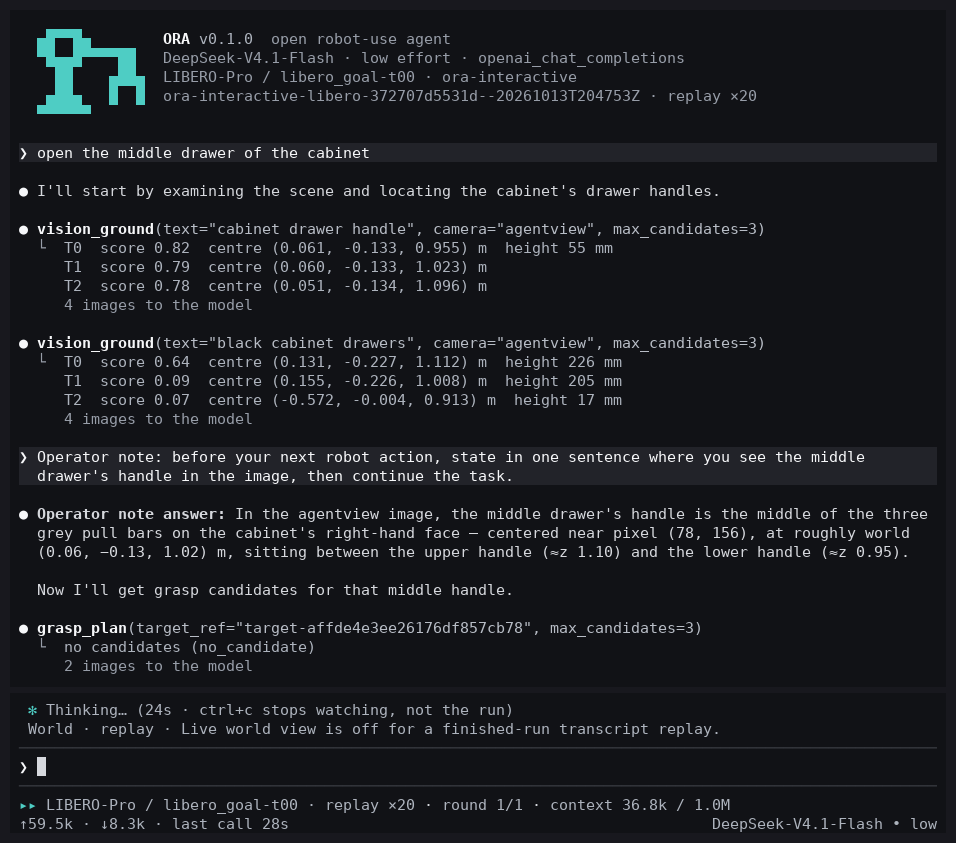
ora watch RUN_ID follows a live run or replays a finished one as a terminal
transcript; ora interactive --spec and ora local add a task picker and let
you steer the running agent. Their pi-tui front end ships in ora-pi/ with
the agent core, so the npm ci --prefix ora-pi above installs it. ora interactive without --spec
shows a run in the Pi agent core's own terminal UI, which you can detach and
re-attach (ora attach); it needs nothing beyond the agent core above.
See run and inspect,
interactive sessions and
run ORA on your computer.
./scripts/ora play --env synthetic        # free play: a scene, no task, your instructions in turn
./scripts/ora web setup                   # once: build ORA's web page
./scripts/ora web RUN_ID                  # a live run's conversation and cameras in the browser
./scripts/ora replay RUN_ID               # a finished run on the same page at 16x (--export out.mp4: a video)
In free play the agent is Pi as a coding agent with the robot
as its device: besides the robot tools it can script the robot in Pi's
sandboxed codemode or with the ora-robot command, and the supervisor still
executes every action. On a GPU server without a display, ora-remote runs
the command over SSH and shows the terminal UI on your computer and the
cameras, or ORA's web page, in your browser
(remote GPU server).
Choose an environment
| Environment | Robot / simulator | Guide |
|---|---|---|
| LIBERO / LIBERO-Pro | Panda manipulation in MuJoCo | Install and run |
| RoboTwin | Dual-arm manipulation in SAPIEN | Install and run |
| RoboDojo | Isaac Sim task environments | Install and run |
The simulators, assets, perception weights, and GPU requirements are installed separately from ORA. Supported setups records the tested scope.
Find what you need
| I want to… | Read |
|---|---|
| Use a self-hosted model or Anthropic | Model APIs |
Store a key or add my own endpoint (ora providers) |
Keys in the terminal |
| Give the robot instructions myself, or script it | Free play · Scripting the robot |
Bring up, calibrate and recover a real robot cell (ora cell) |
Run a real robot cell |
| Run on a GPU server from my laptop, or watch in the browser | Remote GPU server · Web view |
| Fix an installation or run problem | Troubleshooting |
| Inspect a run or export evidence | User guide |
| Understand the action and trust boundaries | Runtime lifecycle |
| Configure a benchmark task | Configuration |
| Run the official suites on a cluster | Official suites · Evaluation protocol |
| Train a model on ORA's episodes | Connect a training loop |
| Find where something lives in the source | Architecture · Code map · Repository structure |
| Change tools or robot instructions | Tool surfaces · Prompt bundles |
| Add a simulator | Add an environment · Environment compatibility |
| Contribute or maintain these docs | Start contributing · Contributing · Documentation guide |